The Quick Answer
Looking for the best free deepfake tools in 2025?
Akool offers the most versatile experience with both image and video capabilities, while FaceFusion Colab delivers the highest quality results.
For beginners, Faceswapper.ai provides the simplest interface with no learning curve. All five tools featured here are completely free to start using today.
Have you ever wondered what you’d look like as your favorite movie character? Or perhaps you’re curious about the technology behind those viral videos where celebrities appear to say things they never actually did?
Deepfake technology has revolutionized digital content creation, and in 2025, these tools are more accessible than ever.
In this comprehensive guide, I’ll take you through the top 5 free deepfake image generators available right now.
After testing over 15 different platforms, these five stand out for their quality, ease of use, and free access options.
I’ll also share expert tips to get professional-looking results and address important ethical considerations you need to know.
- What Exactly Is Deepfake Technology?
- The 5 Best Free Deepfake Tools in 2025
- Comparing the Tools: Which One is Right for You?
- Step-by-Step Tutorial: Creating Your First Deepfake
- Ethical Guidelines: Using Deepfakes Responsibly
- Legal Considerations You Must Know
- Expert Tips for Professional-Quality Results
- What’s Next for Deepfake Technology?
- FAQs About Deepfake Image Generators
Disclosure: This post may contain affiliate links. This means if you click on one of the links and purchase anything I may receive some affiliate commission at no extra cost to you. Thanks in advance for your support.
What Exactly Is Deepfake Technology?
Deepfake technology uses artificial intelligence and machine learning algorithms (specifically deep neural networks) to create or manipulate visual and audio content with a high degree of realism.
The term “deepfake” combines “deep learning” and “fake,” highlighting how these advanced AI systems can generate convincing artificial media.
At its core, deepfake technology works through a process called Generative Adversarial Networks (GANs). This involves two AI systems working together:
- A generator that creates fake images
- A discriminator that tries to determine if the images are fake
Through repeated iterations, the generator becomes increasingly skilled at creating realistic face swaps that can fool not only the discriminator but also the human eye.
The practical applications of this technology include:
- Entertainment (placing yourself in movie scenes)
- Creative content creation
- Virtual try-ons for cosmetics or fashion
- Educational simulations
- Social media filters and memes
While early deepfake technology required significant computing power and technical expertise, the tools we’re reviewing today have simplified the process dramatically, making face-swapping accessible to everyone.
The 5 Best Free Deepfake Tools in 2025
After testing dozens of options, these five tools represent the best balance of quality, accessibility, and free features.
Tool 1: Akool – Best All-Around Face Swapping Tool

Free plan offers: 50 credits upon Google account signup
- Video swaps: 10 credits each
- Image swaps: 4 credits each
Akool stands out as the most versatile deepfake tool I’ve tested, offering exceptional quality for both image and video face swaps.
Its automatic face detection technology is remarkably accurate, capable of identifying and mapping facial features across different angles and lighting conditions.
How to Use Akool:
- Sign up with your Google account to receive 50 free credits
- Upload your source image (the face you want to use)
- Upload your target image or video
- Select faces if multiple are detected
- Use the enhancement options for better quality
- Download your completed deepfake
What makes Akool particularly impressive is its multi-angle face mapping technology.
This proprietary feature ensures that when swapping faces in videos, the replacement looks natural even as the subject moves and turns. The results are surprisingly convincing, especially considering this is a free tool.
Pro tip: For best results in Akool, use source images where the face is clearly visible with neutral lighting and a straight-on angle. This gives the AI more accurate data to work with when creating the swap.
Tool 2: Faceswapper.ai – Simplest User Experience

Free plan offers:
- 6 image swaps daily without registration
- 10 image swaps daily with free account
Faceswapper.ai delivers exactly what its name promises — a straightforward, no-frills face swapping experience.
What it lacks in advanced features, it makes up for in accessibility and ease of use. The entire process takes less than a minute from upload to download.
The interface is minimalist by design, requiring just three simple steps:
- Upload a target image
- Upload the face you want to swap in
- Click “Generate” and download the result
Unlike some competitors, Faceswapper.ai doesn’t overwhelm you with settings and options. This makes it perfect for beginners or those who just want quick results without learning a complex tool.
Best for: Quick social media posts, beginners to deepfake technology, and users who prioritize simplicity over advanced features.
Tool 3: Remaker – Best for Multiple Face Swaps
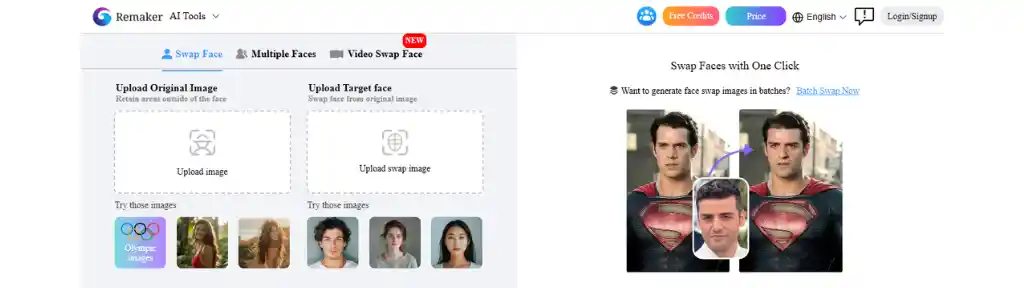
Free plan offers: 30 credits upon signup
- Single face swap: 1 credit
- Video swapping requires paid plan
Remaker distinguishes itself with its exceptional handling of multiple face swaps in a single image.
While many tools struggle when trying to replace several faces simultaneously, Remaker maintains quality and consistency across all faces in the image.
The platform uses a transfer learning algorithm that allows for more natural-looking results by preserving facial expressions while changing identities. This is particularly useful for group photos where you want to swap multiple faces at once.
Unique features of Remaker:
- Expression preservation technology that maintains the original facial expression
- Batch processing for swapping the same face across multiple images
- Enhanced skin tone matching for more realistic blending
For creative projects involving multiple subjects, Remaker provides the most consistent results among the free tools available in 2025.
Tool 4: Facetool – Top Option for Mobile Face Swapping

Free plan offers: 24 image swaps daily
In an increasingly mobile world, Facetool stands out as the premier smartphone-based deepfake generator.
Available on both iOS and Android, this app brings sophisticated face-swapping technology to your pocket, no desktop required.
The mobile optimization doesn’t come at the expense of quality. Facetool uses a compressed AI model that requires less processing power but still delivers impressive results.
The app interface is intuitive, with large buttons and simplified controls designed specifically for touchscreens.
Why Facetool excels for mobile users:
- Offline processing capability for creating deepfakes without data usage
- Social media integration for direct sharing to platforms
- Gallery organization that keeps your creations neatly categorized
- Low battery optimization that consumes less power than other AI apps
For on-the-go content creation or spontaneous face swaps during social gatherings, Facetool provides convenience without sacrificing quality.
Tool 5: FaceFusion Colab – High-Quality Results
Free plan offers: Unlimited processing (limited by Google Colab usage)
For those willing to climb a slightly steeper learning curve, FaceFusion Colab rewards your effort with the highest quality deepfakes available without paying.
This open-source tool leverages Google’s Colab platform to provide free access to powerful GPU processing — something that would normally require expensive hardware.
The quality difference is immediately noticeable, particularly in challenging scenarios like:
- Different lighting conditions between source and target
- Difficult angles or partial face visibility
- High-resolution output requirements
- Videos with complex movements
Setting up FaceFusion Colab:
- Access the FaceFusion Colab notebook
- Make a copy to your Google Drive
- Follow the setup instructions (run each cell in order)
- Upload your source and target images/videos
- Adjust parameters for best results
- Run the processing cell and download results
While more technical than other options, FaceFusion offers unparalleled customization.
You can adjust parameters like face recognition confidence thresholds, blending modes, and enhancement levels — giving you far more control over the final output.
Technical users will appreciate: The ability to modify the Python code directly for custom implementations and the option to save your parameter configurations for consistent results across projects.
Comparing the Tools: Which One is Right for You?
Choosing the right deepfake image generator can be overwhelming, given the variety of options available. Each tool has its unique features, strengths, and weaknesses.
Here’s a quick comparison to help you decide which one fits your needs best.
Feature Overview
- Akool: Best for versatility, allowing both image and video face swaps with user-friendly automatic face detection.
- Faceswapper.ai: Ideal for casual users seeking simplicity, with a daily limit on face swaps that keeps things straightforward.
- Remaker: Offers a balance of quality and ease of use, perfect for those wanting to experiment with single and multiple face swaps.
- Facetool: Great for mobile users, allowing easy face swaps directly from your smartphone with a decent daily limit.
- FaceFusion Colab: Best for those prioritising quality; it requires a bit of setup but delivers stunning results.
The right tool depends on your specific needs:
For a balance of features: Akool offers the best all-around experience
For quick, simple swaps: Choose Faceswapper.ai
For mobile convenience: Facetool is your best option
For multiple people in one image: Remaker excels
For highest possible quality: FaceFusion Colab is worth the learning curve
Step-by-Step Tutorial: Creating Your First Deepfake
Let me walk you through creating your first high-quality deepfake using Akool (the most versatile option for beginners):
1. Prepare Your Images
Before starting, gather:
- A clear, front-facing image of the face you want to use (source)
- The image or video where you want to place the face (target)
For best results:
- Choose images with similar lighting conditions
- Ensure faces are clearly visible without obstructions
- Higher resolution images produce better outcomes
2. Sign Up for Akool
- Visit Akool’s website
- Click “Sign Up” and use your Google account
- You’ll automatically receive 50 free credits
3. Create Your First Face Swap
- Click “Create New” on your dashboard
- Choose between image or video face swap
- Upload your target image/video first
- Upload your source face image
- The system will automatically detect faces
- If multiple faces are detected, select which ones to swap
- Click “Create” to begin processing
4. Enhance Your Results
After initial processing, you’ll have options to:
- Adjust face positioning
- Enhance skin blending
- Improve lighting consistency
- Increase output resolution (uses more credits)
5. Download and Share
Once satisfied with the preview:
- Click “Download” to save your creation
- Choose your preferred format (JPG for images, MP4 for videos)
- Share directly to social media or save to your device
Troubleshooting tip: If the face detection seems off, try uploading a different source image with better lighting and a more direct angle. The AI needs clear facial features to create convincing swaps.
Common Problems and Solutions
Even with today’s advanced technology, you may encounter some challenges when creating deepfakes. Here are solutions to the most common issues:
Problem: Unnatural Blending Around Edges
Solution: This usually occurs due to lighting differences between source and target images.
- Choose images with similar lighting direction and intensity
- In tools like Akool and FaceFusion, increase the blending strength
- Use the face enhancement option (available in most tools)
Problem: Misaligned Features
Solution: When eyes, nose or mouth don’t align properly:
- Use a source image with a similar head angle as the target
- For video deepfakes, provide multiple reference images of the same person
- In FaceFusion Colab, adjust the landmark alignment settings
Problem: Low Resolution Output
Solution: To improve quality:
- Always start with high-resolution source images
- Use the quality enhancement options (costs more credits in some tools)
- For best results, use FaceFusion Colab with upscaling enabled
Problem: Processing Fails or Crashes
Solution: When the tool stops working:
With Colab, use a runtime with GPU acceleration
Reduce video length or image resolution
Close other browser tabs to free up memory
For mobile apps, ensure you have sufficient storage space
Ethical Guidelines: Using Deepfakes Responsibly
The power of deepfake technology comes with significant ethical responsibilities. Here are crucial guidelines to follow:
Always Obtain Consent
Before creating and sharing a deepfake involving someone’s likeness:
- Get explicit permission from the person whose face you’re using
- Explain how and where the deepfake will be shared
- Be prepared to remove it if the person changes their mind
Clearly Label Synthetic Content
To prevent confusion or misinformation:
- Add a disclaimer that the content is AI-generated
- Use watermarks or text overlays when appropriate
- Avoid creating content that could be mistaken for reality in sensitive contexts
Avoid Harmful Applications
Deepfake technology should never be used to:
- Create non-consensual intimate content
- Spread misinformation or fake news
- Impersonate others for fraudulent purposes
- Embarrass, harass, or harm others
Consider the Impact
Before sharing your deepfake:
- Think about how it might affect the people portrayed
- Consider the broader social implications
- Ask yourself if it could be misinterpreted or misused
Remember that in many jurisdictions, misuse of deepfake technology can have legal consequences, including civil liability and even criminal charges.
Legal Considerations You Must Know
The legal landscape around deepfakes continues to evolve rapidly. Here’s what you need to know:
Current Legislation
Several countries and states have enacted specific laws governing deepfake creation and distribution:
- The United States has federal laws prohibiting malicious deepfakes
- The European Union regulates deepfakes under the Digital Services Act
- Canada, Australia, and the UK have updated their digital impersonation laws
The most stringent restrictions apply to:
- Political content (especially during election periods)
- Commercial use without permission
- Content involving minors
- Non-consensual intimate imagery
Copyright Considerations
When creating deepfakes, remember:
- Using copyrighted images or videos as your source material may constitute infringement
- Creating derivative works with someone’s likeness could violate their publicity rights
- Commercial use requires additional permissions and possibly licensing
Protection Under Fair Use
In some jurisdictions, deepfakes may be protected as:
- Parody or satire
- Commentary or criticism
- Educational content
- Artistic expression
However, these protections vary significantly by country and context. When in doubt, consult a legal professional familiar with digital content law in your jurisdiction.
Expert Tips for Professional-Quality Results
After creating hundreds of deepfakes across all these platforms, I’ve discovered techniques that significantly improve quality:
1. Use Multiple Reference Images
Instead of relying on a single source image:
- Provide 3–5 different angles of the same face
- Include expressions similar to those in your target video
- Ensure consistent lighting across reference images
This gives the AI more data to work with, resulting in more realistic face mapping.
2. Match Resolution and Aspect Ratios
For seamless integration:
- Use source and target images with similar resolutions
- Maintain the same aspect ratio when possible
- Avoid stretching or distorting either image
3. Pay Attention to Lighting
Lighting inconsistencies are the biggest giveaway in amateur deepfakes:
- Match the direction of light between source and target
- Consider color temperature (warm vs. cool lighting)
- Pay attention to shadows and highlights
4. Post-Processing Matters
After creating your deepfake:
- Adjust color grading for consistency
- Apply subtle blur at edges for better blending
- For videos, stabilize facial movements if necessary
5. Hardware Considerations
For faster processing:
- Use computers with dedicated graphics cards when possible
- Close memory-intensive applications while processing
- For FaceFusion Colab, use GPU runtime instead of CPU
What’s Next for Deepfake Technology?
As we look toward the future, several emerging trends will shape deepfake technology:
Real-Time Processing
The next generation of deepfake tools will operate in real-time, enabling:
- Live video calls with face swapping
- Instant face replacement in streaming content
- Interactive applications and gaming
Enhanced Body Mapping
Current technology focuses primarily on faces, but research is advancing on:
- Full-body replacement in videos
- Gesture and movement transfer
- Voice tone and speech pattern matching
Detection Technology
As deepfakes become more realistic, detection tools are also evolving:
- AI-powered deepfake detection algorithms
- Digital content authentication systems
- Blockchain verification of original media
Mainstream Applications
Look for deepfake technology to expand into:
- Film production (reducing costs for scenes requiring specific actors)
- Language learning (seeing yourself speaking different languages)
- Virtual try-on services for retail and fashion
The ethical and legal frameworks will continue developing alongside these technological advancements, hopefully striking a balance between innovation and protection.
Have you tried any of these deepfake tools? Share your experiences in the comments below! I’d love to hear about your creations and any tips you’ve discovered along the way.
Remember: Always use deepfake technology ethically and responsibly. When in doubt, err on the side of caution and respect for others’ privacy and consent.
FAQs About Deepfake Image Generators
What are deepfake image generators?
Deepfake image generators are tools that use artificial intelligence to manipulate images and videos, allowing users to swap faces or create realistic alterations.
Are these deepfake tools really free?
Yes, all five tools offer genuinely free tiers with varying limitations. Akool and Remaker use a credit system with free starter credits, while Faceswapper.ai and Facetool offer daily free usage limits. FaceFusion Colab is free to use with Google Colab’s free tier restrictions.
Can I use deepfake tools for commercial purposes?
Commercial use of deepfakes involves complex legal considerations including rights of publicity and copyright. Most commercial applications require explicit permission from the people whose likenesses are used. Additionally, the terms of service for many free tools prohibit commercial use
How can I ensure ethical use of deepfake technology?
Always seek consent, avoid malicious use, and consider the potential impact of your creations to ensure ethical use of deepfake technology.
Do I need technical skills to use these tools?
While some deepfake tools are easier to use than others, basic computer skills are generally sufficient. Most tools have user-friendly interfaces designed for all skill levels.
Which tool is easiest for complete beginners?
Faceswapper.ai offers the simplest experience with a three-step process and no registration required for initial use. Its straightforward interface makes it ideal for first-time users.
How can I tell if an image has been deepfaked?
Common signs include unnatural blending at the edges of the face, inconsistent lighting, blurring around facial features, and unusual artifacts in high-contrast areas. However, high-quality deepfakes created with tools like FaceFusion Colab can be extremely difficult to detect without specialized software
Are these tools safe to use?
The tools themselves are safe from a technical perspective, but users should be cautious about:
Uploading sensitive personal images
Privacy policies regarding uploaded content
Potential misuse of the technology
Always read the terms of service and privacy policy before using any deepfake tool.