Docsie is a fantastic product documentation software that makes collaborating on product documentation a breeze.
With Docsie, you can easily work together with your team to create, edit, and organize all your product information in one place.
It’s not just about writing boring documents; Docsie lets you publish interactive knowledge portals that are engaging and user-friendly.
Whether you have one product or a range of them, Docsie helps you manage all your documents effortlessly. Plus, the best part is that you can gather valuable feedback from your users, making improvements based on their insights.
With Docsie, your product documentation process becomes a delightful and efficient experience. Explore more in this Docsie review article.
Disclosure: This post may contain affiliate links. This means if you click on one of the links and purchase anything I may receive some affiliate commission at no extra cost to you. Thanks in advance for your support.
Benefits of using Docsie
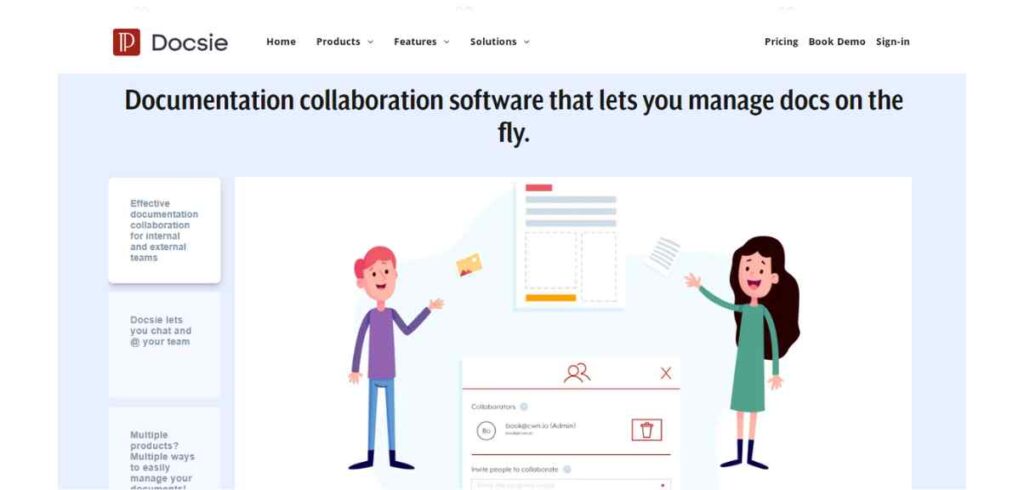
Documentation collaboration software
To maximize efficiency, benefit from Enterprise Ready, Enterprise Grade Documentation available on the public cloud, private cloud, or on-premise. Stay organized and on track with their Team Collaboration and Project Management functionality.
No matter the size of your business – be it Fortune 500 or SMBs – Docsie caters to all. Utilize powerful enterprise features, including ghost AI language translation, content localization, and custom knowledge portals.
Keep things simple with it’s fully managed Quick Deploy Knowledge Portals – just write your docs, and Docsie will handle the rest!
Seamlessly manage both internal and external teams, from employees to contractors and freelancers. Control access effortlessly using JWT Token Authentication, IAM RBAC, and Passwords. With four user roles for granular control, apply access controls per document, shelf, or workspace. Plus, secure your sensitive docs with password protection.
Experience the convenience of centralized document storage, writing, collaboration, and hosting all in one place – with Docsie Documentation Collaboration Software. Get started today to revolutionize your documentation process!
Internal Knowledge Base
Embrace Docsie version management to iterate on your documents, ensuring your internal teams always have the latest knowledge at their fingertips. Plus, they’ve got you covered with historical knowledge retention.
Communication is key, and with Docsie language management, you can effortlessly share knowledge with team members, freelancers, and contractors in their native language.
Their Ghost AI Language Translation automates seamless translation into various languages like French, German, Spanish, Swedish, Portuguese, Chinese, Arabic, and more!
Gathering feedback is essential for continuous improvement. Utilize Web Analytics to understand employee sentiment for your internal knowledge base.
Collect valuable ratings, text comments, and user session recordings to enhance user experiences. Monitor page metrics, search queries, and top articles or keywords to optimize knowledge accessibility.
Get ready to revolutionize your internal knowledge sharing and elevate your team’s productivity with Docsie. Let’s make your Internal Knowledge Base the go-to resource for your entire organization!
External Knowledge Base
As a user, you’ll appreciate the global search feature that allows your customers to find the exact knowledge they need quickly. Filter results by version, language, or topic for a seamless experience.
Their self-service documentation empowers your customers to learn faster, while also lightening the load for your IT support and customer service teams.
The out-of-the-box integrations with Zendesk, Slack, and Zapier are a game-changer. With Docsie, collecting customer feedback and user ratings for individual pages or your entire knowledge base becomes a breeze.
Real-time sharing and viewing of feedback are possible through ticket creation in Zendesk, channel updates in Slack, and various automations in Zapier.
Worried about content localization for international SEO? Fear not! Docsie has got you covered with AI-powered content translations.
Publish native language content effortlessly for your global customers, just by enabling the ‘Automatically machine-translate’ feature.
So, if you’re looking to elevate your customer experience, streamline your documentation process, and cater to a global audience, Docsie is the way to go! Explore the possibilities and embrace the power of Docsie’s customer-centric solutions.
Online Markdown Editor
Say goodbye to traditional Word documents and text files! As a user, I’ve found Docsie to be the ultimate web-based, online markdown editor for creating and editing documentation.
With Docsie, adding images, videos, dynamic web elements, and iFrame integrations to my markdown documents is a breeze. The platform offers familiar and powerful markdown formatting options, including headers (H1, H2, H3, H4), ordered and unordered lists, tables with multiple columns, code fences (JS, React, HTML, etc.), inline images, sub-section and step headers, block quotes, and various text formatting options like underline, italics, bold, and strikethrough. I can even easily add CDN images using simple syntax!
What’s even more impressive is the seamless integration with popular source code management (SCM) platforms like GitHub, GitLab, and BitBucket. I can effortlessly import and export README.md, SECURITY.md, CHANGELOG.md, or any other Markdown content to my chosen SCM repository, streamlining my documentation workflow.
Docsie has truly transformed my documentation creation and editing process, making it efficient, user-friendly, and collaborative. If you’re looking for a web-based markdown editor that combines power and simplicity, Docsie is the perfect choice!
API Documentation Tool
Docsie is a game-changer when it comes to centralized API documentation for both our team and customers.
With Docsie, building API documentation has never been easier. All the information is accessible in one place, making it convenient for our team and customers to reference.
Employees can log in to Docsie to view or edit API documentation, promoting collaboration and ensuring everyone is on the same page.
What’s truly impressive is how Docsie seamlessly integrates with Swagger API definition files. By importing a Swagger Definition file, we can generate an API documentation draft in just a few seconds.
This saves us valuable time that we can now dedicate to maintaining our APIs to a high standard, while ensuring developers and coders understand the technical aspects of our product or service.
Collaboration is effortless with Docsie. Our internal team can work together on API documentation using built-in chat with comments and @ mentions. We can even assign tasks and set due dates to keep API writers on track, promoting efficient workflow and productivity.
Docsie Pricing
Docsie has three different plans which are AI-Writer, AI-Writer Plus and AI-Writer Enterprise with different features. But no exact pricing is mentioned at their website. You need to book a demo to know the pricing of any of the plan.
Conclusion On Docsie Review
In conclusion, Docsie has transformed our API documentation process, making it user-friendly, collaborative, and highly efficient. If you want centralized API docs that empower your team and engage your customers, Docsie is the way to go!
Passion io Review 2023 [Features, Pricing, Walkthrough]
Topicmojo Review – Is It The Ultimate Topic Research Tool?
Decktopus AI Review: Revolutionizing Presentation Design with AI
InboxPro Review: Boost Your Gmail Productivity With AI+Automation