Krisp noise suppression is a blessing for all those who worked remotely or attend online meetings, conferences, or video & audio calls on a day-to-day basis.
In this comprehensive Krisp ai review article, we will explore everything about this noise filtration software and you will know why it’s a must-have tool for modern-day hybrid workers.
- What is Krisp? Krisp ai Review
- What is Krisp Noise Cancelling? How does Krisp ai work?
- Krisp ai is useful for whom? Who should use Krisp.ai?
- Key Benefits of Using Krisp? Krisp ai Features –
- Krisp's Upcoming Features
- How to use Krisp Noise Cancelling App? How to enable Krisp?
- Krisp ai Pricing: How much does Krisp ai cost?
- Conclusion
- Frequently Asked Questions: F.A.Q about Krisp ai
- Is Krisp ai free?
- How many Krisp ai free minutes do we get in the free plan?
- How to get more free minutes in Krisp ai?
- Which tool is the Krisp ai alternative?
- How to download Krisp noise-canceling app for desktop?
- How to download Krisp noise-canceling app for laptops?
- How to set up Discord with Krisp ai?
- Does Krisp really work?
- Is Krisp ai safe? Krisp ai privacy –
- How to set up Zoom with Krisp ai?
- How many integrations are available with Krisp?
- Krisp ai valuation?
What is Krisp? Krisp ai Review
Krisp is an ai-powered noise-canceling app and eco-reduction software that suppress unwanted background noises during a call.
It makes you look super professional with clear audio regardless of your work environment.
So, there may be the sound of a coffee machine, a child crying, or a dog barking, but you can still run your conferences, calls, webinars, or online meetings with crystal-clear audio.
What is Krisp Noise Cancelling? How does Krisp ai work?
Now you may wonder how an ai powered software can remove unwanted noises?
You may suffering from this problem for a long time and you are not ready to believe that some software can remove all unwanted noises.
Once you start using it you will see how awesome this noise cancellation app is.
Krisp ai uses machine learning and Krisp’s noise suppression technology is powered by a deep neural network.
The neural network is trained with over 20K noises, 50K distinct speakers, and over 2.5K hours of audio.
Krisp noise reduction or noise cancellation can absolutely remove non-humanized background noises.
Krisp ai is useful for whom? Who should use Krisp.ai?
As already mentioned it is a must-have tool for hybrid workers, remote workers, or anyone who wants clear audio without any background or unwanted noises during a meeting, conference, webinar, audio or video call, etc.
So, use the Krisp noise cancellation app if you are –
- Voice over artist
- Remote Worker
- Hybrid Worker
- Live Streamer
- Podcaster
- Youtuber
- Coach or consultant
- Freelancer
- Virtual Assitant
- Webinar host
- Online meetings (host or attendee)
- Virtual Events (host or attendee)
- Online Conferences and so on.
Key Benefits of Using Krisp? Krisp ai Features –
The main features of the Krisp app are –
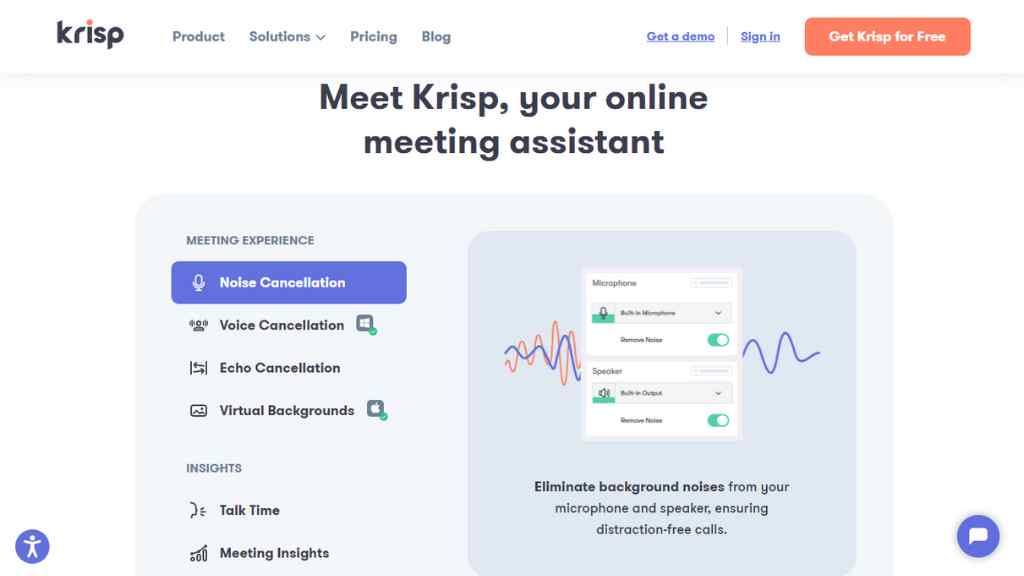
Noise Cancellation of Krisp App (Krisp Noise cancelling Review) –
Krisp noise suppression works bi-directionally, which means krisp’s noise cancellation not only reduces the background noise from your microphone and speaker, but it can also identify and eliminate the sound on the other end.
Krisp creates a smart virtual layer between your device (microphone & speaker) and any communication tool and stops any background noise from passing through.
Krisp ai Voice Cancellation
Krisp ai not just eliminates background noise, it can also eliminate any other voice other than the voice of the speaker or the primary voice.
So, whether you are at home, office, or any other place, you don’t need to worry about other chatters as Krisp’s powerful voice cancellation technology will remove all those voices.
Krisp Echo Cancellation or Echo Reduction
The echo cancellation feature of Krisp ai software can remove echoes that get created when the sound hit the walls of your room or any hard surfaces and bounce back.
It can also remove the acoustic echo, no matter whether your microphone is overly sensitive or your walls are not good for voice recording.
These things are not a problem anymore, because now you have Krisp ai. This feature is very useful for voice-over artists.
Krisp Virtual Background
Krisp ai is the best noise-canceling software, but that’s not all. It is a tool that helps you to maintain your professionalism and branding.
You can use the preloaded images in Krisp or upload your own branded background image. Once you set a virtual background you can use it across all communication and conferencing tools (Webinar tools).
Krisp’s Talk Time: Real-time call participation monitoring
With this feature of Krisp ai software, you will get real-time insight into your meeting participation as it will display the exact amount of time you talked during a meeting.
Krisp’s talk time insight will help you to limit yourself so that you can give others a chance to share their opinions during a conference or meeting and make the meeting more collaborative and productive.
Krisp Meeting Insights: Key Historical Data Points
You will get insights into personal metrics like meeting time, participation, and talk time ratio. You can analyze these metrics to make your meetings more engaging.
Krisp ai call summary
You can keep track of your call performance and the effectiveness of your meetings using this feature.
It will give you insights like the duration of a meeting, the percentage of time you spent speaking, how much noise and echo were canceled by Krisp, etc.
Krisp app can be paired with any HD-supported device, headset, microphone, or speaker. Its visual widget is very useful and you can use Krisp with low power mode.
With Krisp’s video technology you can adjust the brightness of your entire video frame or just of your image, you can blur the background or do video segmentation.
Krisp’s Upcoming Features
Krisp ai is already an incredible noise-canceling software with its existing features but it will keep adding new features –
The upcoming features of Krisp ai are –
- Noise Insights
- Interruption and monologue detection
- Note-taking
- Sentiment Analysis
How to use Krisp Noise Cancelling App? How to enable Krisp?
You can use Krisp ai by downloading its application, Krisp app is available for both windows and mac.
Previously Krisp was available to use as a chrome extension and with its iOS app but they have discontinued those options to focus solely on the Krisp desktop app.
Once you install the app it is very easy to enable Krisp, you just have to toggle the button between on and off, and that’s it, all you need to do is click a button.
However, there are certain system requirements for using Krisp’s desktop app.
Krisp noise-canceling app for desktop: System requirements
Krisp ai windows system requirements: Operating system 64-bit Windows 10 (preferably 1903 or higher), CPU – Intel®️ Core i3 or AMD®️ Ryzen 3, Microsoft .NET Framework – .NET 4.6.2. (latest version is recommended).
Krisp ai Mac system requirements: Operating system – macOS 10.15 Catalina, CPU – Intel®️ Dual-Core, Intel®️ Core i3, Apple M1 ARM-based chip.
You should use Intel®️ Quad-Core or Intel®️ Core i3 CPU if you want to use Krisp video on mac.
Krisp ai Pricing: How much does Krisp ai cost?
Now you may be thinking that this tool is awesome, but can I afford it? How much is Krisp noise-canceling going to cost me?
You will be glad to hear that you can use Krisp ai free forever. You can use Krisp ai for free with limited noise cancellation (60 minutes per day) but you will get all the necessary features like –
Microphone noise cancellation, speaker noise cancellation, acoustic echo cancellation, room echo cancellation, voice cancellation, virtual background, talk time, low power mode, HD Voice, etc.
Krisp ai pricing for paid plans
Personal Pro plan – Once you start with the free plan you will eventually shift to the paid plan in no time, as the paid plan starts at just $5/month (billed $60 annually) or $12/month if billed monthly.
Along with all the features of the free plan, you will get to use 2 devices and unlimited noise cancellation.
Krisp for Small teams (up to 50 seats) – This plan also cost $5 per user, per month, with the annual plan or $12 per user, per month with the monthly plan, which includes team management, centralized billing, SAML SSO, & priority support along with all previously mentioned features.
Krisp ai for Enterprise – Including the team plan features you will get VIP support, per workstation pricing, Management API, deploy & configure centrally, VDI support, SCIM 2.0 API, dedicated customer success manager, personalized onboarding program, and executive business reviews.
You need to contact sales to know the custom pricing for your enterprise plan, you can also get a Krisp ai demo by giving your name, email, company, and job title.
Conclusion
Krisp ai noise suppression technology has a lot of potentials and it is solving a real problem. I think in the future Krisp will be the ‘Canva‘ of noise-canceling software as people will use it on a daily basis.
In today’s world where everything is getting digitized, almost every person requires to do or attend online meetings and calls, so Krisp ai is day-to-day ai solution for both individuals and businesses.
Start using it right now and share this article with those who need to know about Krisp.ai.
Grow Flow Review: Surfer’s AI Growth Management Platform
Yelp for Restaurant Review: 5 Powerful Restaurant Tools
Xendoo Review: Virtual Bookkeeping Service for Small Businesses
Systeme.io Review: All in one platform to grow your business faster
QApop Review: Is it the best Quora Marketing Tool?
FlexClip Review: Free Online Video Editor & Screen Recorder
Frequently Asked Questions: F.A.Q about Krisp ai
Is Krisp ai free?
Yes, Krisp is a free noise cancellation app. You can use it for free forever.
How many Krisp ai free minutes do we get in the free plan?
You can get 60 minutes of noise cancellation on a daily basis if you are on Krips’s free plan.
How to get more free minutes in Krisp ai?
You can get 90 minutes of noise cancellation if you use a professional email instead of a standard email / Gmail.
Which tool is the Krisp ai alternative?
None, Right now there is no such noise-canceling app or software that can replace Krisp.
How to download Krisp noise-canceling app for desktop?
Click here & create an account & then download & install the application for windows.
How to download Krisp noise-canceling app for laptops?
Click here & create an account & then download & install the application for Mac.
How to set up Discord with Krisp ai?
Krisp ai is integrated into Discord, you can click on the noise suppression button or go to Settings → User Settings → Voice and Video → Advanced → Noise Suppression.
Does Krisp really work?
Yes, it does. You don’t have to believe my words, just try it yourself.
Is Krisp ai safe? Krisp ai privacy –
Krisp is safe to use, the audio of your meetings is processed and stored only on your device, not on the cloud. Krisp ai is GDPR compliant and SOC-2 certified.
How to set up Zoom with Krisp ai?
In Zoom go to Zoom → Settings → Audio and change the Speaker/Microphone to Krisp. Now in Krisp turn on the ‘Cancel Noise and Room Echo’ button. That’s it, start your call.
How many integrations are available with Krisp?
You can pair Krisp with 800+ communication tools.
Krisp ai valuation?
Krisp’s estimated annual revenue is currently $32.1M per year.